

Initiate Refund
Allows a merchant to refund payments that were already acknowledged and processed successsfully.
POST https://online.sandbox.tingg.africa/approval/checkout-translation-service/custom/requests/initiate-refundPOST https://checkout.tingg.africa/checkout-translation-service/custom/requests/initiate-refundThis request is used by merchants to initiate a refund request for a transactions that was initially accepted and a product or service was fulfilled.
This can only be used after the merchant has acknowledged the payments as accepted for a transaction in 2 ways:
- Invoking the POST acknowledge endpoint.
- Returning the acknowledgment status on the webhook callback response.
The initiate refunds request achieves the following:
- Validates that a refund can be initiated to the customer based on the amount to refund, the payment channels that were used to make the payment and the details provided to make the refund.
- Log the refund request and forward it for processing. A response will immediately be provided as to whether the validation and logging of the request was successful.
Header Parameters
| Header | Value | Required |
|---|---|---|
| Authorization | Bearer <Bearer_Token> generated during authenticate request in step 1. | YES |
| Content-Type | application/json | YES |
Request Parameters
| Parameter Name | Type | Description | Required |
|---|---|---|---|
| checkoutRequestID | integer | Unique transaction ID identifying the transaction as provided by the Tingg checkout platform. | TRUE |
| merchantTransactionID | string | Unique transaction ID identifying the transaction as given by the merchant. | TRUE |
| refundType | string | A flag indicating the type of refund to be done; can either be fullor partial. | TRUE |
| refundAmount | double | The amount to be refunded. This value is optional if the refundType is full. | FALSE |
| currencyCode | string | A three letter ISO Code for currency the refund amount currency. If not provided, the original request currency will be used. | TRUE |
| narration | string | A reason for the refund. (Has a limit of 100 characters) | FALSE |
| extraDetails | string | A JSON string to provide extra details about the refund e.g. customer bank details for some channels. | FALSE |
Example
Full Refund
{
    "merchantTransactionID":"MTX5057010",
    "checkoutRequestID":"407271",
    "refundType":"full" ,
    "refundAmount":0,
    "currencyCode":"",
    "narration":"",
    "extraDetails":""
}
Partial Refund
{
    "merchantTransactionID":"MTX5057010",
    "checkoutRequestID":"407271",
    "refundType":"partial" ,
    "refundAmount":1000,
    "currencyCode":"KES",
    "narration":"Partial refund for undelivered service",
    "extraDetails":""
}
Response Parameters
| Parameter Name | Type | Description |
|---|---|---|
| status | JSON Object | |
| status.statusCode | integer | A status indicating the result of payment processing. 200 - Refund initiated successfully. 3 - Service sent is invalid. 422 - Missing field / no payments found to refund / invalid currency Code / Refund Failed due to merchant balance issue. 400 - Refund amount exceeds payment amount / Request was already fully refunded. 174 - Exception while initiating refund externally. 500 - Exception while initiating refund internally. |
| status.statusDescription | string | A description of the status provided above. |
| results | JSON Object | |
| results.checkoutRequestID | integer | Unique transaction ID identifying the transaction as provided by the Tingg checkout platform. |
| results.merchantTransactionID | string | Unique transaction ID identifying the transaction as given by the merchant. |
| results.requestStatusCode | integer | Status of the payment received |
| results.payments | JSON Array | An array of the payments made. |
The payments array holds a list of payments that have been made for the current request.
| Parameter Name | Type | Description |
|---|---|---|
| paymentID | integer | Unique payment reference on the Cellulant Payment Gateway |
| payerTransactionID | string | Unique payment reference provided by the payment option ie MPESA reference |
| MSISDN | string | Mobile number used to complete the payment |
| accountNumber | string | Reference presented to complete a payment |
| customerName | string | Customer names. NB: Provided only when available |
| amountPaid | double | Amount paid / authorized by the customer |
| payerClientCode | string | Unique code of the payment option on the Tingg checkout platform |
| clientName | string | Merchants name on the Tingg checkout platform |
| paymentDate | string | Date when the payment was completed by the customer |
| currencyCode | string | Currency code which the customer was charged in by the payment option |
| refundAmount | integer | The total amount that the customer is going to pay. |
Example
Successful Response
{
    "status": {
        "statusCode": 200,
        "statusDescription": "Refund initiated successfully"
    },
    "results": {
        "checkoutRequestID": "716003",
        "merchantTransactionID": "unique_transaction_id07",
        "refundAmount": 100,
        "refundCurrency": "KES",
        "payments": [
            {
                "payerTransactionID": null,
                "MSISDN": null,
                "accountNumber": null,
                "customerName": null,
                "amountPaid": null,
                "payerClientCode": null,
                "paymentDate": null,
                "clientName": null,
                "currencyCode": null,
                "paymentID": null,
                "refundAmount": null
            }
        ]
    }
}
Failure Response
{
    "status": {
        "statusCode": 400,
        "statusDescription": "No payment available for refund"
    },
    "results": null
}
Authentication Failure Response
{
    "message": "Unauthenticated.",
    "status_code": 500
}
Response Status Codes
| Status Code | Description |
|---|---|
| 200 | Success. Refund request successfully logged in the checkout platform. |
| 500 | Failure. Generic failure occurred. Could be as a result of a system failure on the checkout platform. |
| 400 | Bad request - a parameter is missing or empty |
| 422 | Invalid request - returned when a refund initiation is not processed successfully |
Refund status codes
These request status codes indicate the status of a refund when a query status or a refund notification is processed.
| Request status code | Description | Available from |
|---|---|---|
| 184 | This is indicates that a refund of part of the request amount has been initiated. | Query request status |
| 185 | This is indicates that full refund the request amount has been initiated. | Query request status |
| 186 | This is indicates that the part refund for the request was successfully processed. | Query request status and Refund Notification |
| 187 | This is indicates that the full refund for the request was successfully processed. | Query request status and Refund Notification |
| 191 | Refund Expired | Query request status and Refund Notification |
Refund NotificationNotifications are done for final refund status codes 186, 187, and 191.
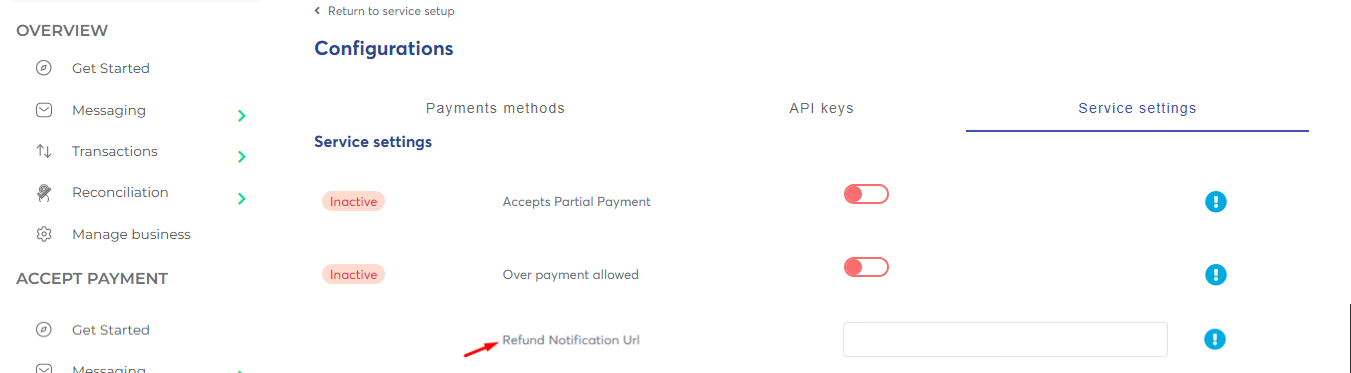
Refund notification is configurable. To receive a final status notification on refund, configure a Refund Notification Url for the service under Service Settings on the gateway portal as shown below.
Refund Notification Request
Key Value Type Description amount double the refunded amount statusCode int the status of the refund refundReference String Reference number for the transaction (sent when initiating a refund) merchantTransactionId String Unique transaction ID identifying the transaction as given by the merchant.
Sample Refund Notification Request{ "amount":30.5, "statusCode":186, "refundReference":"536772882hhd", "merchantTransactionID":"tywvbb63778383" }
Updated 3 months ago